
The AI tool market is overwhelming by design. Every week brings a new launch, a new funding round, a new “this changes everything” headline. The FOMO is real, and the monthly subscription creep adds up fast. £10 here, £20 there. Before you know it, you are spending £200 a month on tools that collectively save you maybe an hour a week.
This article gives you a three-step framework to cut through that. It is not a list of “best AI tools” (those lists are outdated the moment they are published anyway). It is a way to decide for yourself, based on your actual work, what is worth paying for and what is not.
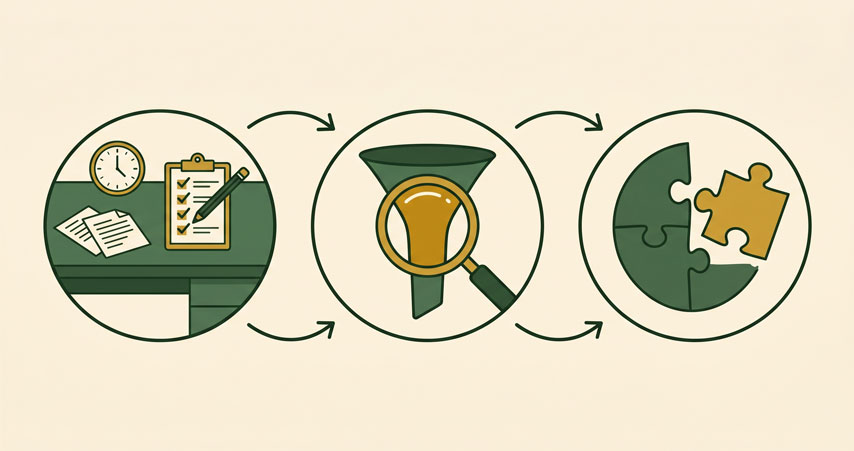
The problem: buying before you understand the workflow
The most common mistake is starting with the tool. You hear about a new AI writing assistant, you sign up for the trial, you play with it for an afternoon, and you decide it is good. But “good” in a trial environment is not the same as “useful in my actual Tuesday afternoon.”
The trial version of anything is impressive because you are testing it on ideal scenarios. You give it a clear prompt. You have time to iterate. You are not stressed, distracted, or working against a deadline. The real test is whether the tool fits into your actual workflow on a normal day. And that is almost never the basis on which people decide to subscribe.
This is why the AI industry has such high churn rates. People sign up, discover the tool does not fit how they actually work, and cancel. But the subscriptions that slip through the cracks, the ones that auto-renew because cancelling requires effort, those add up.
The three-step evaluation framework
Instead of starting with the tool, start with yourself. This framework takes about 30 minutes the first time you do it, and about 5 minutes for every tool you evaluate afterwards.
Step one: map your weekly workflow
Take a piece of paper or a blank document. List the tasks you do every week that involve generating, processing, or organising information. Be specific. Do not write “marketing.” Write “drafting the weekly email to subscribers” and “replying to customer support tickets” and “updating the pricing page.”
This step matters because most people think about AI in general terms. “I should use AI for content.” That is too vague to evaluate any tool against. You need to know exactly what “content” means in your business. Is it five social posts a week? A monthly newsletter? Product descriptions for new inventory? Each of those is a different workflow with different needs.
Spend 15 minutes on this. The goal is a list of 10 to 15 specific, repeatable tasks.
Step two: find the bottleneck
For each task on your list, ask two questions:
How much time does this take? Be honest about the full cycle, not just the execution. If you edit an email three times before sending, count the editing time too. If you spend 20 minutes looking for the information you need before you start writing, count that too.
How much do I dread this? This is not a soft question. Tasks you procrastinate on cost more than their clock time. They cost mental energy, guilt, and the ripple effect of putting things off.
Rank your list by the combination of time and dread. The tasks at the top are your high-value targets. These are the workflows where AI can actually make a difference to your week, not just your feature list.
Step three: match the tool to the bottleneck
Now you know what you need. A tool that saves you 30 minutes on a task you do three times a week is worth more than a tool that saves you 10 minutes on a task you do once a month. Evaluate every subscription against your top two or three bottleneck tasks.
Ask: does this tool genuinely reduce the time or dread associated with this specific task? Or does it just add a new step to my workflow?
If a tool adds a new step, be suspicious. A common trap is buying a tool that requires you to learn a new system, maintain a new dashboard, or restructure your process before you see any benefit. Those tools can be worth it, but only if the long-term saving significantly outweighs the setup cost. For most small businesses, tools that fit into existing workflows win every time.
“I was paying for four AI tools. After doing this exercise, I cancelled three of them and spent the time actually learning the one that mattered. My output went up, not down.”
From the Insight Division Labs free course
Free versus paid: what is actually worth paying for
The question most people actually want answered is: when should I pay? Here is a rough guide based on what we see working in practice.
Free is fine when: the task is occasional, the output quality is good enough with basic prompts, and there is no integration needed. Writing a one-off proposal, summarising an article, brainstorming ideas. The free tiers of ChatGPT, Claude, and Gemini handle these well.
Pay when: the task is frequent, the output needs to be consistently good without hand-holding, or the tool needs to talk to other systems you use. A paid tool that cuts 10 minutes off a task you do 20 times a week saves over three hours a month. At £20 a month, that is a good trade.
Be wary of: tools that charge by usage rather than subscription, unless you have a predictable volume. Usage-based pricing sounds fair but can surprise you. Tools that require an annual commitment before you have tested them in real conditions. Tools that pitch themselves as “all-in-one” solutions but replace existing tools you already use well.

How to test before you commit
Every tool offers a trial. Use it properly. Instead of testing the tool in isolation, force yourself to use it for one of your bottleneck tasks within the first week. If it does not fit that task, it does not matter how many other impressive features it has.
Set a calendar reminder for the day before the trial ends. On that day, ask yourself: did this tool save me time on a real task this week, or did I spend time learning it without getting anything back? Be ruthless. The industry relies on you forgetting to cancel.
One more thing: if a tool requires you to change your workflow significantly, treat that as a cost. Not every tool is worth the reorganisation. The best tools are the ones that disappear into how you already work.
The bottom line
The AI tool market is not going to get smaller. Every week someone publishes a new top 10 AI tools list, and the FOMO intensifies. New tools will keep launching, and the FOMO will keep buzzing. The only reliable defence is knowing your own workflow well enough to evaluate each tool against something concrete.
Start with the map. Find the bottleneck. Match the tool. Everything else is noise.
If you want a head start on identifying the workflows that actually matter, the free Insight Division Labs course walks through three practical AI setups. Each one targets a specific, common bottleneck. No tool list. No hype. Just a place to start that you can actually use this week.